QuoteKit
Try it free

Estimates for independent contractors

Send the quote before you leave the driveway.

Price the job with labor, materials and markup. Send it as a link. Your customer approves and signs on their phone.

Try it free See how it works

No sign-up to try. An example quote is already loaded.

From a sketch to a signed job

Every line adds up while you type.

Labor, materials, a flat fee. Tick an option, add the tax, and the total is exact to the cent. Then it goes out the door as a link.

Scroll

A-00How it works

Four steps from the walk-through to a signed job.

Every picture below is the real tool, showing one sample job: a hall bathroom refresh for $2,395.00.

01/ 04

Price the job

Add labor by the hour, materials with your markup, and flat fees. The total adds itself up while you type, in exact cents.

  • Labor: hours × rate
  • Materials: quantity × your cost + markup
  • A profit panel that only you ever see
The QuoteKit builder: customer and job details, labor and materials lines, the live total and the profit panel
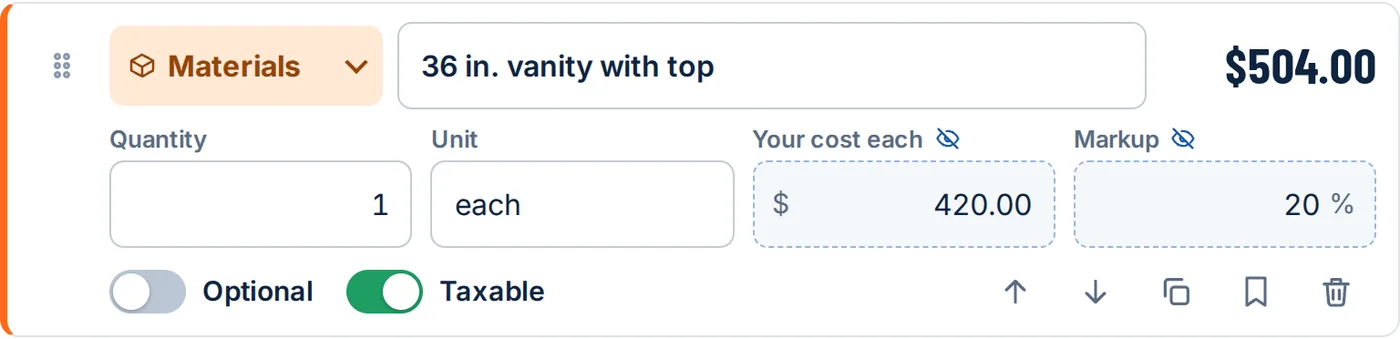
A materials line: quantity 1, unit each, your cost $420.00, markup 20 percent, price $504.00
Your cost + markup
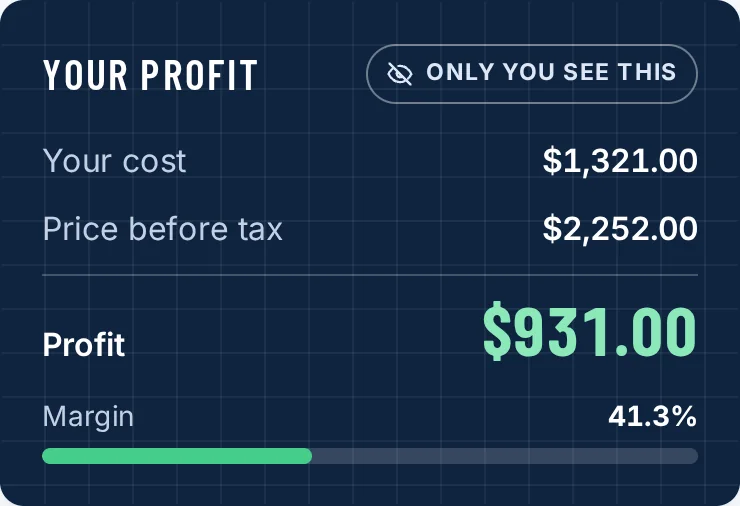
The Your profit panel: your cost $1,321.00, price before tax $2,252.00, profit $931.00, margin 41.3 percent
Only you see this

02/ 04

Send it as a link

Every saved quote has its own link. Copy it, text it, or share it from your phone. Your customer needs no app and no account.
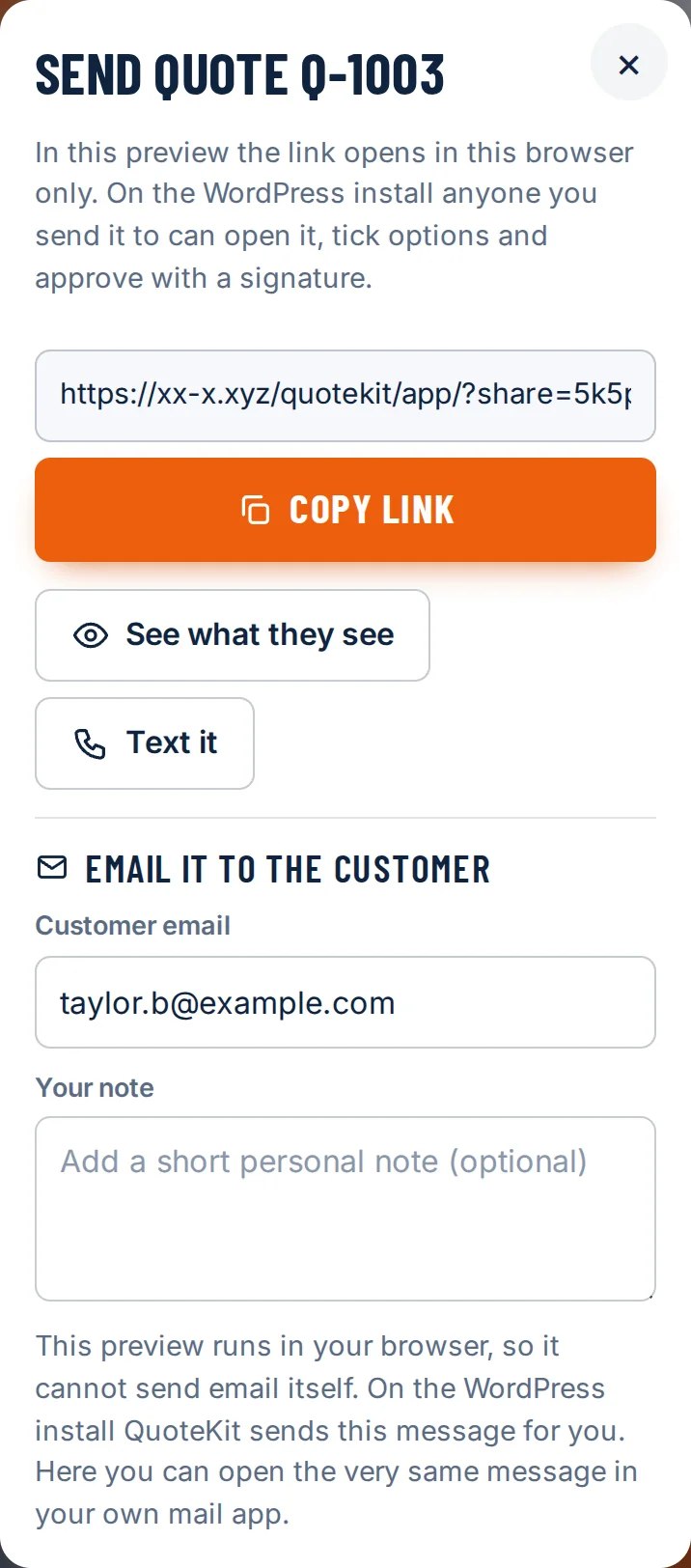
  • Copy link, Text it, or Share from your phone
  • Email it straight from QuoteKit on Pro and Crew
  • Branded with your name, logo and color
The Send quote dialog on a phone with the link, Copy link, See what they see, Text it and Email it to the customer
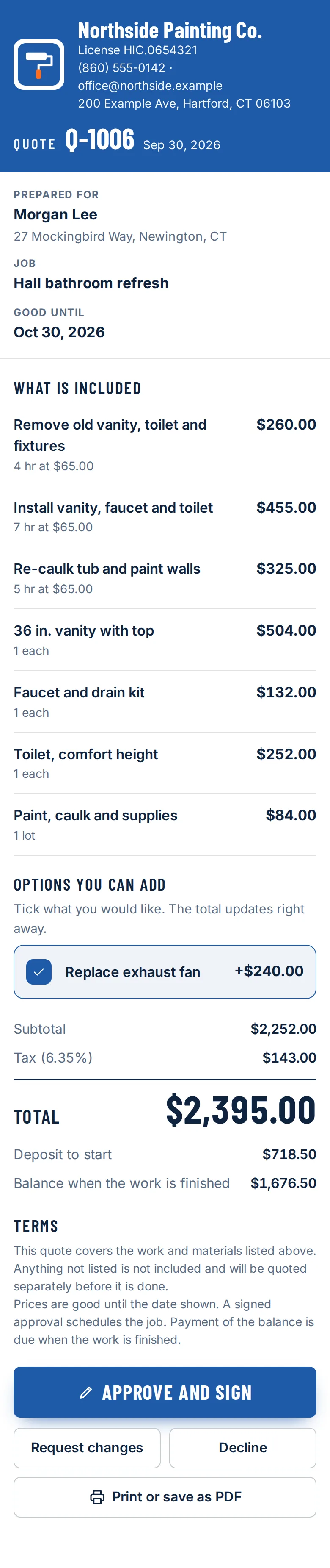
What the customer sees on their phone: the business header, the quote number, line items, an option to tick, the total and the Approve and sign button

Your phone

Your customer's phone

03/ 04

The customer signs on their phone

They read the quote, type their name and sign with a finger. You get an email, and the quote locks with a signed record.
  • Approve, request changes, or decline
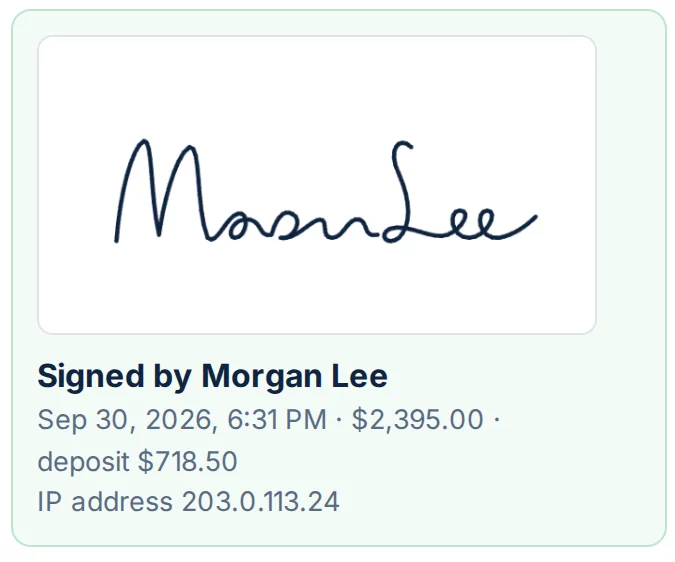
  • Signer, time, amount and IP address are recorded
  • An approved quote cannot be quietly edited
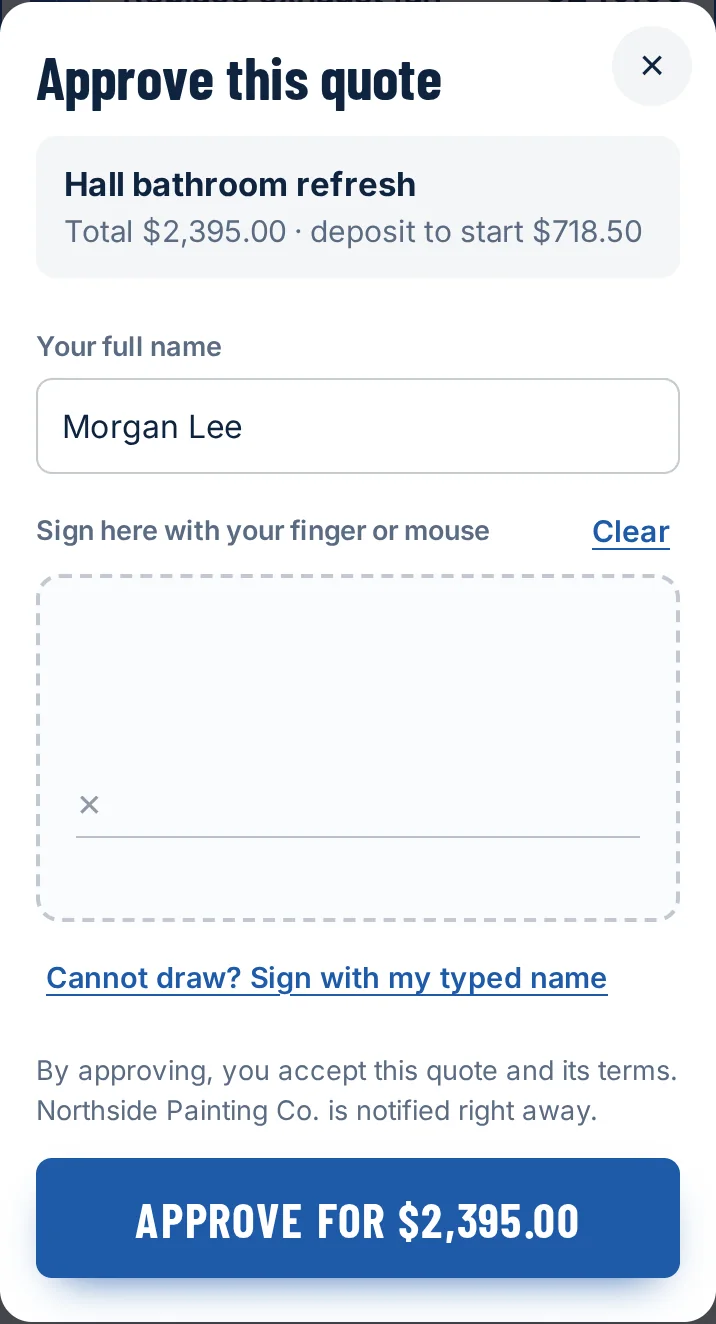
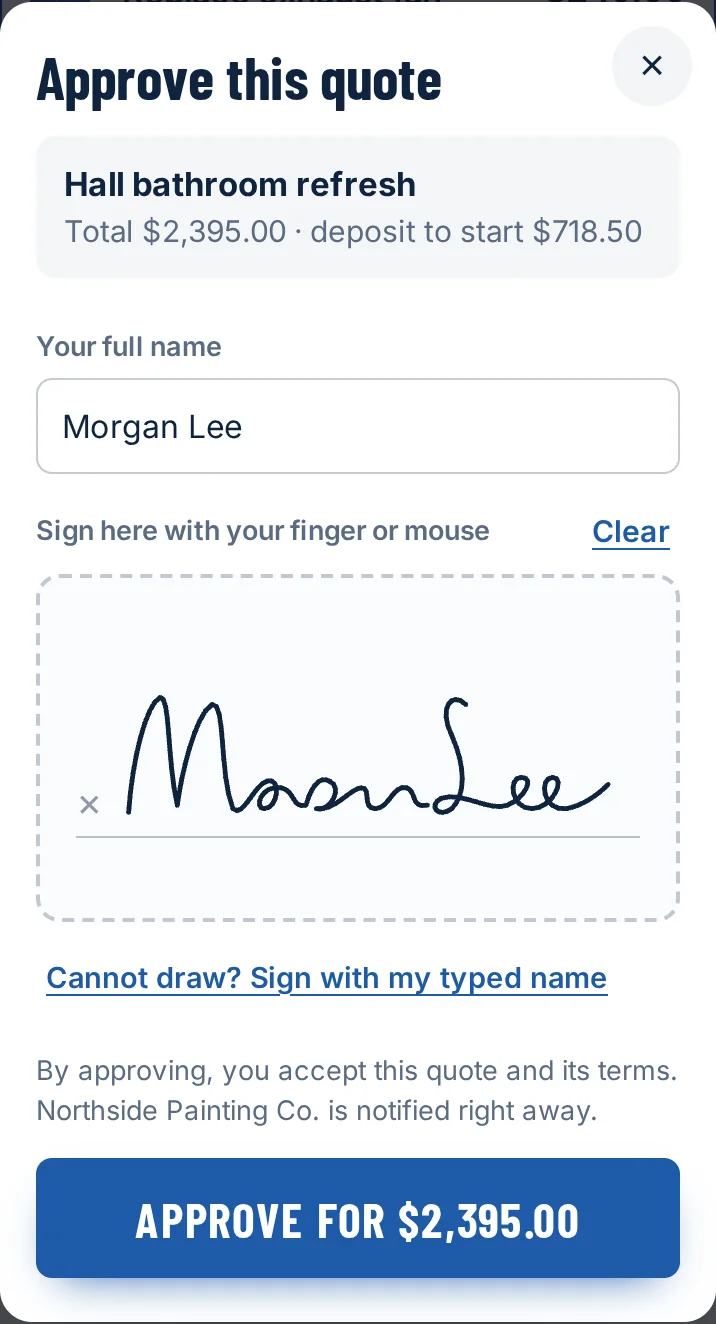
The Approve this quote dialog: the customer has typed the name Morgan Lee and signs in the box with a finger
The signed record on the contractor side: the signature, Signed by Morgan Lee, Sep 30 2026, $2,395.00, deposit $718.50, and the IP address
Kept with the quote

04/ 04

Know where every job stands

One list of every quote: draft, sent, viewed, approved. See when the customer opened it, and what is still waiting on an answer.


  • Open pipeline, approved this month, win rate
  • Search and filter by status
  • Numbers come from your own saved quotes only
Q-1006 Draft Sent Viewed Approved
The quotes dashboard: open pipeline $4,946.87, approved this month $6,572.43, win rate 75 percent, and eight sample quotes with their statuses
A contractor in a cap sitting in the driver's seat of a white work van, looking at his phone

Built for the truck, not the office

The walk-through is done. So is the quote.

Big type, big buttons, and the total always in view. Start from a trade template, change the numbers to yours, and send it while the job is still fresh in everyone's mind.

Open the builder

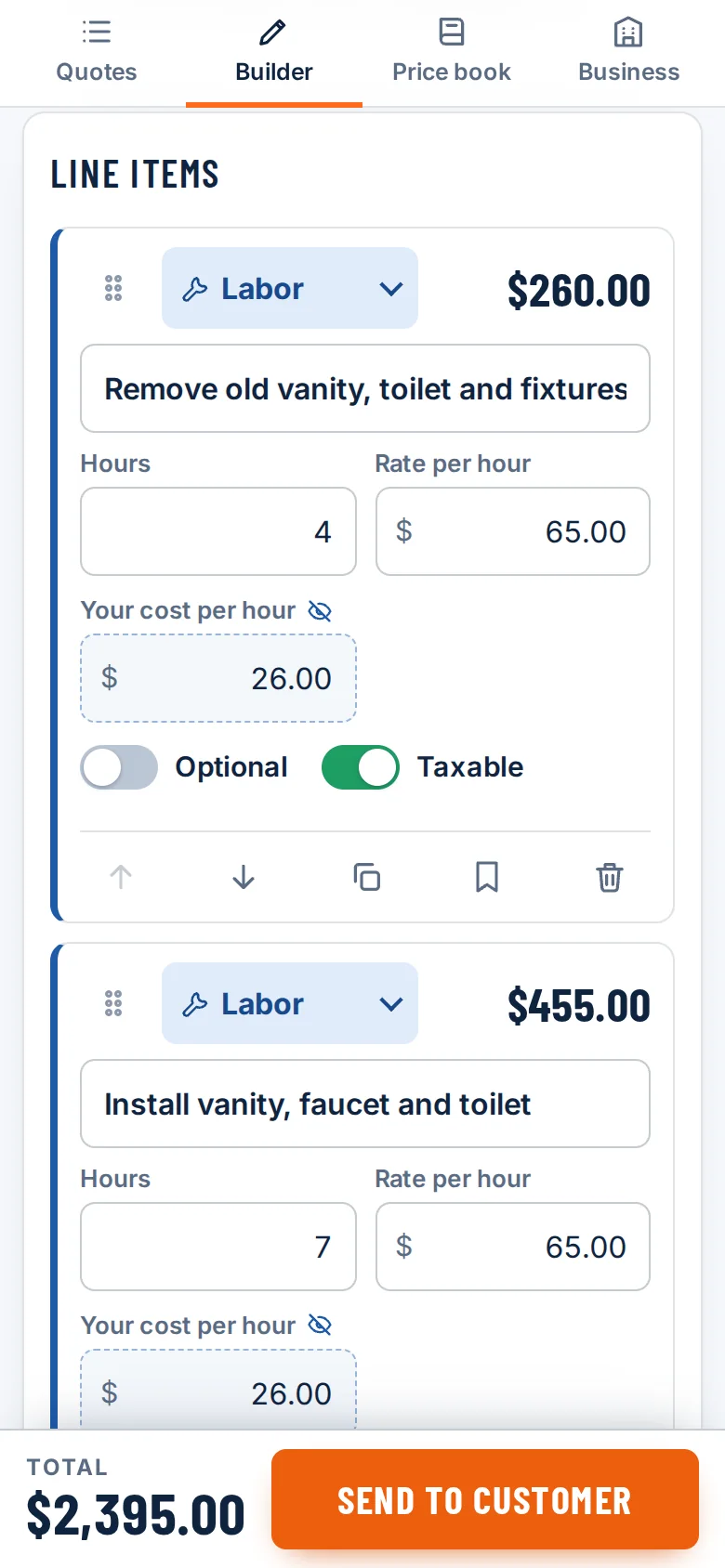
The QuoteKit builder on a phone: two labor lines, and the total $2,395.00 with a Send to customer button fixed at the bottom

A-05Trades it fits

Ten trades. One way to quote.

Each template opens in the builder with sensible lines already in place. The prices are placeholders: change every one to your own.

Totals are the templates' placeholder prices before options and tax, exactly as the tool shows them. They are not quotes for anyone. See what is in each template.

A-06Two views

Same line. Two views.

Your customer sees a clean price. You see what it costs you. Your costs and markup are taken out on the server before the customer's page is built, so they are never on their phone at all.

CustomerCustomer view of a labor line: Remove old vanity, toilet and fixtures, 4 hr at $65.00, $260.00
YouBuilder view of the same line with hours 4, rate per hour $65.00 and your cost per hour $26.00
Your cost per hour stays with you.
CustomerCustomer view of a materials line: 36 in. vanity with top, 1 each, $504.00
YouBuilder view of the same line with your cost each $420.00 and markup 20 percent
They see the price, never the markup.
CustomerCustomer view of an option: a ticked box, Replace exhaust fan, plus $240.00
YouBuilder view of the same line as a flat fee of $240.00 with your cost $95.00 and the Optional switch on
A switch for you, a tick box for them.
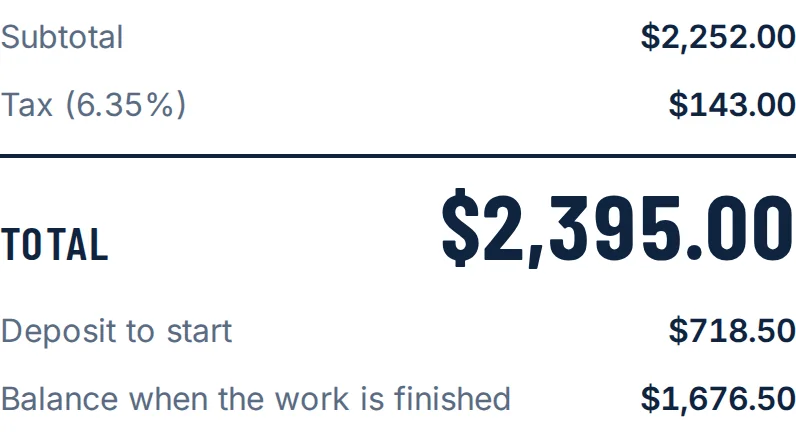
CustomerCustomer totals: subtotal $2,252.00, tax $143.00, total $2,395.00, deposit to start $718.50, balance when the work is finished $1,676.50
YouYour profit panel: your cost $1,321.00, price before tax $2,252.00, profit $931.00, margin 41.3 percent
Profit and margin, updated as you type.
Looking up through the timber frame of a house under construction, a carpenter sitting on a beam

You already know what the job costs. QuoteKit puts it in front of the customer and gets you a yes in writing.

A-07Pricing

Start free. Upgrade when it pays for itself.

Three quotes a month cost nothing. There is no card to enter and no trial clock.

Free

$0forever

Send your first quotes.

  • 3 quotes a month
  • Customer approves online with a signature
  • 10 trade templates
  • "Made with QuoteKit" line on the customer view
Start free

No card. No time limit.

For weekly quoting

Pro

$19/ month

For contractors quoting every week.

  • Unlimited quotes
  • No QuoteKit line on your quotes
  • Price book of your saved items
  • PDF download
  • Email quotes to customers

Billed monthly. Cancel any time.

Crew

$39/ month

Upsells, deposits and records.

  • Everything in Pro
  • Optional items your customer can tick on or off
  • Deposit line
  • Signature audit trail export (CSV)
  • Your own quote numbering

Billed monthly. Cancel any time.

Compare the plans line by line

A-08Questions

Asked before anyone signs up.

All 16 questions

Do I need an account to try it?

No. Open the app and an example quote is already loaded. Change anything, watch the total update, and preview it as your customer would see it. You are only asked for an email and password at the moment you save.

Can my customer see my costs or markup?

No. The page your customer opens is built on the server from a copy of the quote with your costs, markup, profit, and activity log removed. Those numbers are not hidden in the page: they are never sent to it.

How does the signature work?

The customer types their full name and draws a signature with a finger or mouse. People who cannot draw can sign with their typed name instead. QuoteKit stores the signature image, the name, the date and time, the amount approved and the IP address, and locks the quote.

Does QuoteKit send invoices or take payments?

No. QuoteKit builds estimates, sends them and records the approval. It does not invoice, take card payments from your customers, schedule jobs or do your books.

ENDYour turn

Open the builder. The example is already loaded.

Change a rate, tick an option, preview it as your customer. You are only asked for an email when you save.

Try it free See pricing

Free for 3 quotes a month. Pro is $19/mo, Crew is $39/mo.